Wireless Temperature Monitoring: How Industrial Systems Work and Deploy
Most temperature points in a plant are awkward to wire. They sit on a rotating dryer, on a transformer bushing, at the top of a silo, or three buildings away across a yard where trenching a conduit costs more than the instrument. Over twenty years of commissioning instrumentation in the field, I have seen more temperature loops delayed by cable routing than by the sensor itself.
Wireless temperature monitoring exists to remove that cable, and when it is specified correctly it does so without giving up the accuracy or the data trail you would expect from a wired loop.
This guide explains what happens inside a wireless temperature node, how battery life and reporting rate trade against each other, which radio protocols reach how far, and how to lay out a system for the applications where wireless temperature earns its place. It is the temperature companion to our guide on the wireless pressure transmitter; the engineering overlaps, but the sensing side and the deployment patterns are different enough to treat on their own.
When Wireless Temperature Monitoring Pays Off
Wireless is not automatically the right choice. It is the right choice when the cost or difficulty of cable outweighs the convenience of continuous power. The clearest cases are:
- Rotating or moving equipment such as dryers, mixers, kilns, and mobile skids, where a fixed cable cannot follow the asset.
- Remote or distributed points spread across a tank farm, yard, or multiple buildings, where each new cable run is a separate civil job.
- Retrofits into a running plant, where opening cable trays and process penetrations means a shutdown you would rather avoid.
- Temporary or seasonal monitoring, such as a curing pour or a commissioning survey, where the installation only needs to last weeks.
Where the point is fixed, close to a marshalling cabinet, and needs a fast, permanent, safety-rated signal, a wired loop-powered transmitter is still the better answer. If you are weighing whether the measurement even needs a transmitter versus a bare element, our note on the temperature element versus transmitter decision covers that first fork before you reach the wireless question.
Inside a Wireless Temperature Node
A wireless temperature node does the same signal-conditioning work as a head-mounted transmitter, then adds a radio and a battery instead of a 4-20 mA loop. Understanding that front end matters, because it is where accuracy is won or lost.
The node accepts a resistance signal from an RTD or a millivolt signal from a thermocouple. For an RTD it drives a small, precise excitation current through the element and measures the voltage, then converts resistance to temperature using the Callendar-Van Dusen relationship of IEC 60751. For a thermocouple it reads the Seebeck millivolts and applies cold-junction compensation at the terminal block, then linearizes against the IEC 60584 tables.
These two steps, linearization and cold-junction compensation, are exactly why you put electronics at the sensor rather than running raw wire back to a panel where lead resistance and terminal temperature would corrupt the reading.
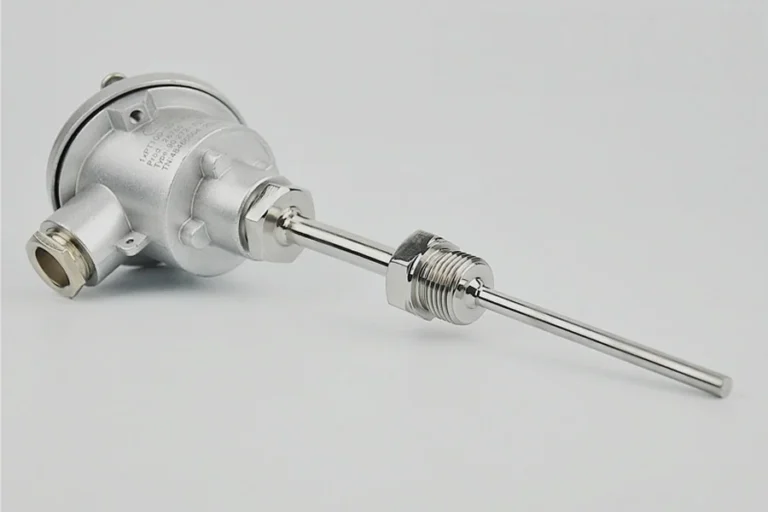
The HMK HM110 wireless temperature sensor, for example, takes PT100 or PT1000 Class A inputs and K-type or S-type thermocouples across a -200 C to +1600 C span, with selectable plus or minus 0.5%, 0.25%, or 0.1% FS accuracy and a stated long-term stability of plus or minus 0.1% FS per year. A universal-input node like this means one hardware model covers both your RTD points and your high-temperature thermocouple points.
To save power, the node does not measure continuously. It wakes on a schedule, excites the sensor, takes a reading, transmits, and returns to sleep. That intermittent excitation is the reason a temperature node can run for years on a battery, and it leads directly to the next decision.
Battery Life Follows Update Rate
The single most useful thing to understand about wireless temperature is that temperature is a slow variable, and slow variables are cheap to monitor wirelessly. A pressure surge or a vibration event can happen in milliseconds, so those nodes must sample quickly and spend more energy. Most process and asset temperatures change over minutes or hours, so a reporting interval of one to fifteen minutes captures everything you need while the node sleeps more than 99% of the time.
That sleep is where the battery life comes from. Push the interval out and the battery lasts longer; pull it in for a fast-moving thermal process and it drains sooner. It is a straight trade you set per point:
- Fast (seconds): reserve for genuine thermal transients. Expect months, not years, of battery life.
- Standard (1 to 5 minutes): the normal choice for process, storage, and asset monitoring.
- Slow (15+ minutes): ambient, warehouse, and structural points where nothing changes quickly.
Hardware sizing follows the same logic. The HM110 runs on a 7.4 V / 5000 mAh lithium pack with a 9 to 36 V DC or solar option for points you can reach; the combined HM200H wireless temperature and pressure transmitter carries a 38 Ah rechargeable lithium battery rated for 24-plus months of continuous operation. When you plan a deployment, set the reporting interval first, then confirm the battery chemistry supports the years you expect between service visits.
Protocol and Range Decide Coverage
The radio choice sets how far each node reaches and how you collect the data. There is no universally best protocol; there is a best one for your site geometry.
- LoRa and LoRaWAN trade data rate for distance. They carry small temperature payloads several kilometers and penetrate buildings well, which suits distributed plants and yards. A private LoRa link gives you control; LoRaWAN gives you a standard.
- Cellular (NB-IoT, 4G) skips the gateway entirely and sends each node straight to the cloud, which is right for isolated assets with no local infrastructure.
- WirelessHART builds a self-healing mesh inside a process unit, useful where obstructions are dense and you want redundant paths.
- Bluetooth and Wi-Fi are short-range and best for a single room or a handheld survey.
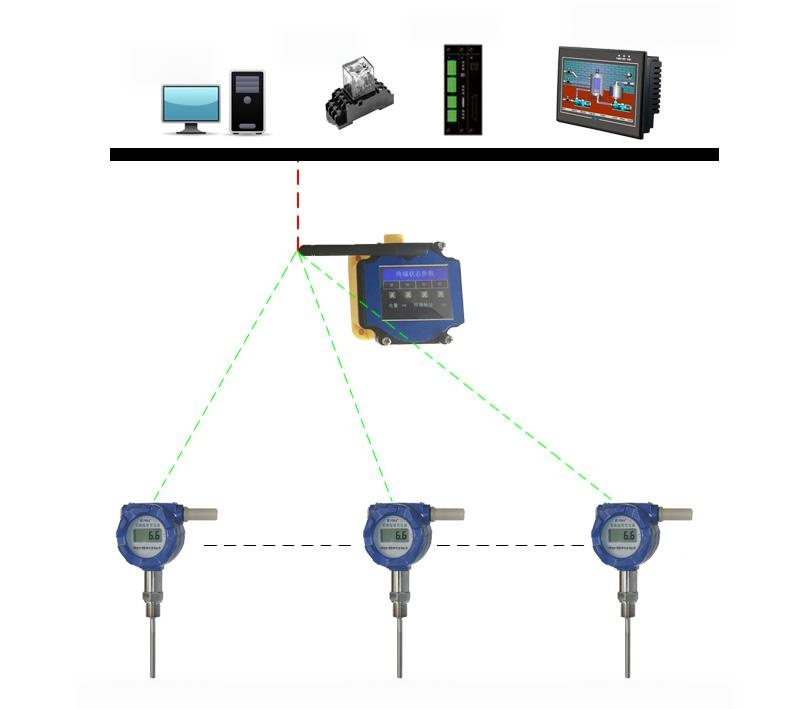
For a gateway-based layout, the HMK HL10A LoRa gateway aggregates up to 500 nodes and reaches roughly 5 km line-of-sight, about 1 km over obstructed terrain, and up to 15 km in the open, on the regional band (902 to 928 MHz in the US).
It runs private LoRa or LoRaWAN and forwards data over 4G-Cat1 or dual Ethernet using MQTT, TCP, or UDP, which is how the readings land in your SCADA, historian, or the HMK HL-series monitoring display. The gateway, not the node, is what determines your coverage footprint, so it is the first thing to place on a site plan.
Deployment Patterns by Application
Temperature monitoring has its own application shapes that do not look like pressure. A few recur often enough to plan around:
- Cold chain and pharmaceutical storage. Here the goal is mapping, not a single point. You distribute nodes through a cold room or warehouse to prove uniformity and hold a continuous, time-stamped record for good-distribution-practice audits. Node density is driven by air-flow dead zones, not by process piping.
- Concrete curing. Embedded nodes track the maturity of a pour so crews know when to strike formwork or apply load, replacing guesswork and destructive test cylinders. These are temporary deployments where the weeks-long battery and the buried, cable-free node are the whole point.
- Rotating and electrical assets. Transformer bushings, motor windings, and bearing housings run hot before they fail. A wireless node on the housing trends the hotspot against a baseline and flags drift, without slip rings or trailing cable on a moving part.
- Data centers and server rooms. Nodes across the hot and cold aisles build a thermal map that feeds cooling control and catches recirculation. The HL900 monitoring platform is built for exactly these rooms, with a touchscreen and RS485/RS232 aggregation for cabinets, cold pools, and labs.
In every one of these, the pattern is many slow points, mapped and trended, rather than one fast loop. That is what makes wireless the natural fit.
Selecting a Wireless Temperature System
Work through the system from the sensor outward, and specify each layer against the point it serves:
- Sensor and range. Match the element to the temperature: PT100 for accuracy up to roughly 500 C, thermocouple for higher. Confirm the node accepts your element type and class.
- Accuracy and stability. Choose the accuracy grade the application justifies, and check the annual drift figure, not just the initial spec.
- Reporting interval and battery. Set the interval from how fast the point moves, then size the battery for your service window.
- Protocol and range. Pick the radio from your site geometry, and place gateways for coverage before you count nodes.
- Integration. Confirm the data path into your SCADA, historian, or display over a protocol you already run, such as MQTT or Modbus.
- Environment. Verify the ingress and ambient ratings for the location; washdown, outdoor, and hazardous areas each raise the bar.
HMK builds the full chain rather than a single node: the HM110 wireless temperature sensor and the combined HM200H wireless temperature and pressure transmitter at the point, the HL10A gateway for coverage, and the HL-series display for the control room. If you are still deciding between wireless and a wired loop, or scoping a mixed system, our wireless sensor systems overview shows how the pieces fit, and the wireless pressure transmitter guide covers the pressure side of the same network.
Frequently Asked Questions
How accurate is a wireless temperature sensor compared with a wired transmitter?
The accuracy comes from the same front-end electronics, so a wireless node matches an equivalent wired transmitter at the sensor. What differs is the update rate, not the reading. A node reporting every few minutes gives you the same measured value a wired loop would, just less often.
How long does the battery last?
It depends almost entirely on the reporting interval. At a standard one-to-five-minute interval, industrial nodes commonly run one to several years; a node like the HM200H is rated for 24-plus months of continuous operation. Report every few seconds and you trade years for months.
Can one wireless node measure both RTD and thermocouple inputs?
A universal-input node such as the HM110 accepts PT100/PT1000 and K/S thermocouples, so one model covers both moderate and high-temperature points. You still match the element type to the temperature range of each point.
What is the wireless range in a real plant?
Line-of-sight figures are optimistic indoors. A LoRa gateway rated at 15 km in the open typically delivers a few kilometers line-of-sight and around 1 km through structures. Plan coverage from the obstructed number and add gateways where walls and metal block the path.
Does wireless temperature monitoring measure humidity too?
HMK wireless nodes are built for temperature, and in the HM200H, pressure. Humidity is a separate sensing element; if you need combined temperature and humidity, specify it explicitly rather than assuming a temperature node includes it.
How does the data reach our SCADA?
The gateway forwards node data over MQTT, TCP, UDP, or Modbus to your SCADA, historian, or a local HL-series display. Choose a gateway that speaks a protocol your system already uses so no middleware is needed.
About the author: Li Long is an Application Engineer at HMK TECH with more than 20 years of field instrumentation experience across 20-plus countries, covering on-site installation, commissioning, and application optimization for oil and gas, water treatment, chemical, power, and food and beverage. Read more from Li Long →